
Gift Finder
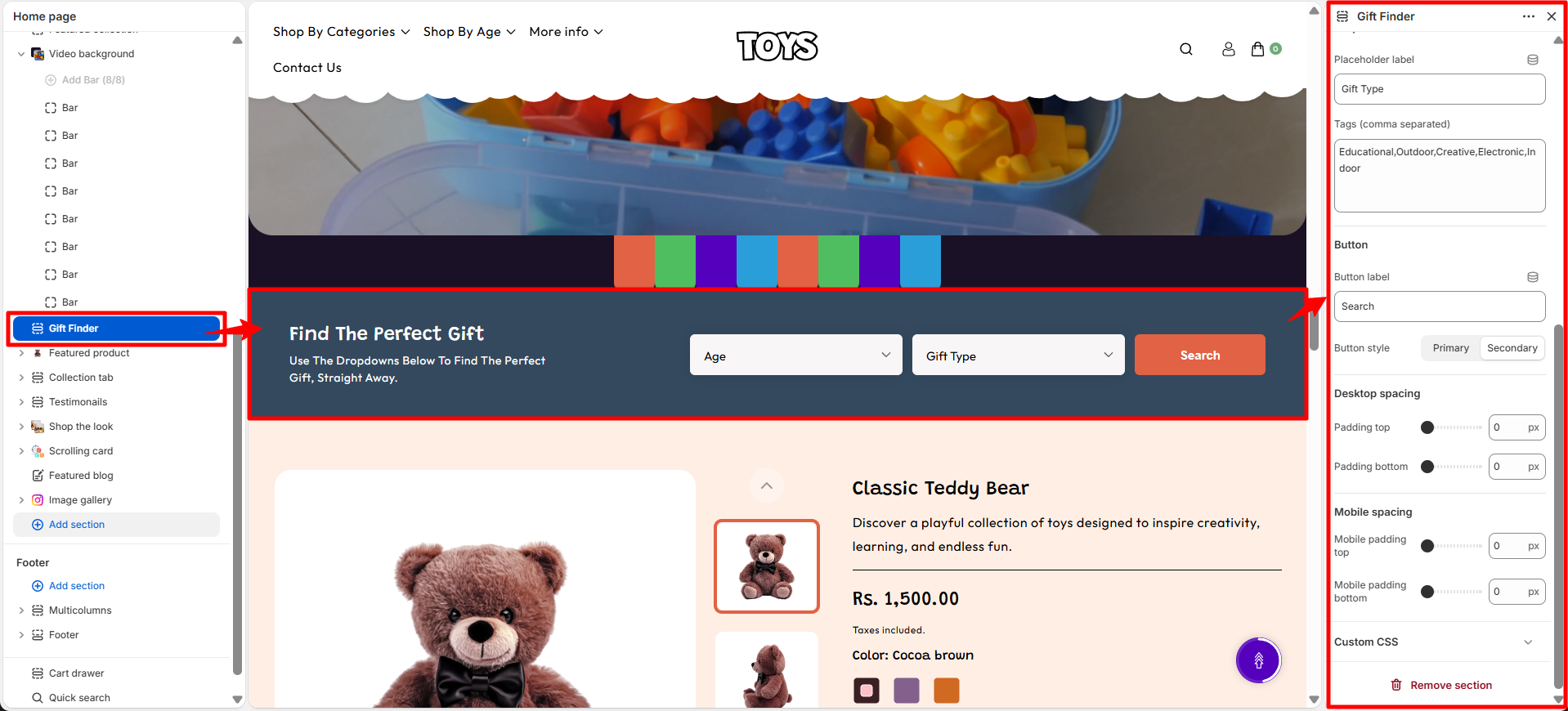
The Gift Finder section in the Soft theme helps customers quickly discover suitable gifts by filtering products based on selected criteria. By choosing options such as age group and gift type, shoppers can easily find relevant products without having to browse through multiple collections.
This section provides a simple and user-friendly search experience, making it easier for customers to find the perfect gift for any occasion. It enhances product discovery, improves navigation, and helps create a more personalized shopping experience.

Gift Finder Section Settings
The section settings allow you to control the layout, spacing, and overall appearance of the Gift Finder section.
- Color Scheme – Choose the color scheme for the section to match your store branding and overall design.
- Heading – Add a main title for the section, such as “Find The Perfect Gift”, to introduce the gift finder feature.
- Subtext – Add supporting text below the heading to explain how customers can use the gift finder.
- Dropdown 1
- Placeholder Label – Add the label displayed inside the dropdown before a selection is made, such as “Age”.
- Tags – Enter comma-separated tags that will be used as filter options in the dropdown.
- Dropdown 2
- Placeholder Label – Add the default label shown inside the second dropdown before selection.
- Tags – Add comma-separated options that customers can select from the dropdown filter.
- Button Label – Customize the text displayed on the search button.
- Button Style – Choose the button appearance style, such as Primary or Secondary.
- Desktop Spacing – Adjust the spacing of the section on desktop devices.
- Padding Top – Set the top spacing of the section for desktop view.
- Padding Bottom – Set the bottom spacing of the section for desktop view.
- Mobile Spacing – Adjust the spacing of the section on mobile devices.
- Mobile Padding Top – Set the top spacing of the section for mobile view.
- Mobile Padding Bottom – Set the bottom spacing of the section for mobile view.
Steps
- Open the Theme Customizer.
- Navigate to the Gift Finder section on the homepage.
- Click Add Block to create a new content block.
- Upload an image and add the heading and text content.
- Configure the button label and link to the desired page.
- Adjust layout settings such as block width, spacing, and image ratio.
- Click Save to apply the changes.